shopify · · 7 min read
Choosing Between Shopify Online and Offline Access Tokens
Choose Shopify Admin API tokens by permission boundary, not by whether a request starts in a browser. Covers staff access, background jobs, expiring offline tokens, and safe refresh.
 Mttao @bearboy80 1,456 words 中文 →
Consider an app that lets a support agent add a note to an order and also syncs orders to an ERP after a webhook. Both features call the Admin API. They should not necessarily use the same credential.
The support action may need to run with that agent’s Shopify permissions. The webhook handler has no agent session at all; it might run hours after anyone last opened the app. That distinction is more useful than the names online and offline. A browser request does not automatically call for an online token, and an offline token does not mean a credential that lasts forever.
If you are still choosing the app’s overall shape, start with Choosing a Shopify App Stack: Official Template, Hybrid, or Custom. The merchant workflow and integration owner determine which authentication paths your team needs to implement.
Choose whose authority Shopify should apply
An online access token is tied to the staff member who opened the app. Use it when Shopify should enforce that person’s permissions or attribute an action to them. If the app has permission to manage orders but the current staff member does not, the online token does not elevate them to the app’s full access.
An offline access token represents the app’s authorization on a store. It survives staff sessions and is Shopify’s default for most app work. It is the natural fit for webhooks, queue consumers, scheduled imports, and other work that must continue without an open Admin tab.
The distinction is about authority, not where the button lives. A page can use an offline token for a store-level feature. In that case, the app must decide for itself which signed-in users may trigger it. Conversely, using an online token does not implement business rules Shopify cannot see. If your help desk assigns tickets to individual agents in your own database, your backend still has to check those assignments.
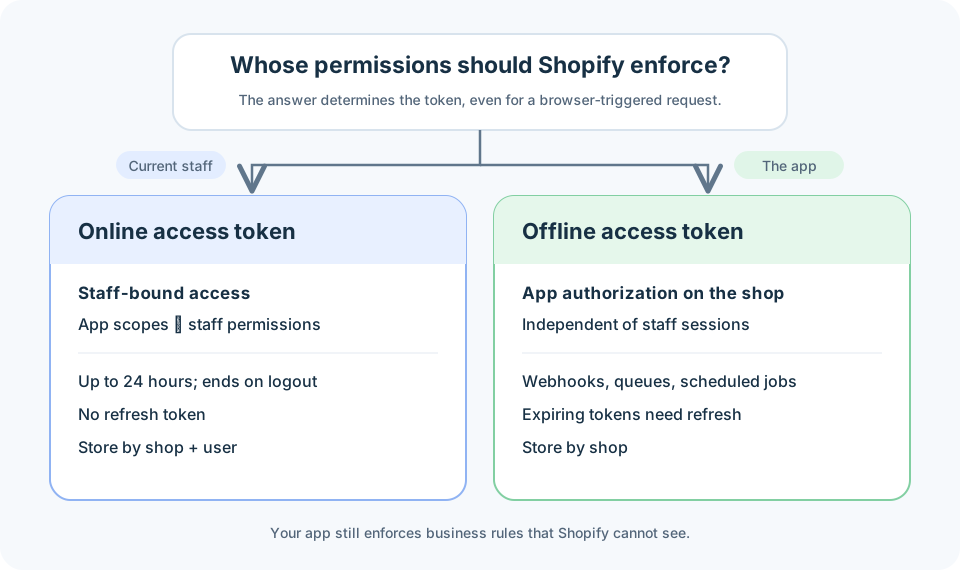
A common storage mistake follows from treating both values as a generic shop.accessToken. The first version of an app only has a background sync, so it stores one offline token per shop. Later, a staff-facing feature saves an online token into the same field. The page keeps working, while the next queue job inherits a staff-bound credential and eventually fails. Keep the two token types separate even if both features belong to one app.
What changes when a token is online
Shopify evaluates an online token against both the app’s approved scopes and the staff member’s permissions. The response includes associated_user.id and associated_user_scope; the latter reflects the intersection of app scopes and user permissions. A shop owner succeeding on an API call tells you little about whether a support agent can make the same call.
The token lasts at most 24 hours and is revoked when that staff member logs out of Shopify Admin. It has no refresh token. During an active embedded-app session, you can obtain a fresh ID token and exchange it for another online access token. A standalone app reacquires one through its authorization flow; when requesting online access with the authorization-code flow, include grant_options[]=per-user in the authorization URL.
Cache online tokens by at least shop and user ID, and treat the recorded expiry as an upper bound. Logout can end access earlier. The same separation should apply to any data cached under a user’s permissions; otherwise, one staff member could receive data fetched for another.
Error handling should distinguish a permission failure from an expired credential. For the GraphQL Admin API, a valid online token without the required access can produce ACCESS_DENIED in errors[n].extensions.code. An expired token produces 401 Unauthorized. Re-running login will not fix a missing app scope or a staff permission that was never granted. Check those permissions for ACCESS_DENIED; investigate expiry or revocation before reacquiring a token for a 401.
The embedded-app credential path
An embedded frontend obtains an ID token from App Bridge and sends it to its own backend. The ID token proves the current Shopify user and store session. It carries no Admin API permissions and does not belong in X-Shopify-Access-Token.
After validating the ID token, the backend can exchange it with Shopify for an access token. In token exchange, requested_token_type selects online or offline access; an expiring offline token also requires expiring=1. ID tokens are short-lived, so fetch a fresh one when an exchange is needed instead of saving the one from the first page load.
If the app was generated from Shopify’s official template, check its authentication helpers before implementing this exchange yourself. A standalone app uses an authorization-code flow instead. Its grant_options[]=per-user parameter is not a token-exchange parameter; the two flows should not be mixed together.
For development store setup and the local CLI workflow, see the Shopify app development environment tutorial. Its examples use the older CLI and Remix scaffold.
Offline no longer implies non-expiring
Older integrations often stored an offline token as a single string and reused it until uninstall. That data model needs revisiting for public apps. Shopify now requires expiring offline access tokens on this schedule:
- Since April 1, 2026, new public apps calling the Admin API must use them.
- Starting January 1, 2027, the requirement covers all public apps calling the Admin API, including apps created before April 2026.
Shopify lists both the GraphQL and REST Admin APIs as affected. The requirement does not apply to custom apps or apps created by merchants. A non-expiring token is not irrevocable, though: uninstalling the app or revoking its credentials still ends access.
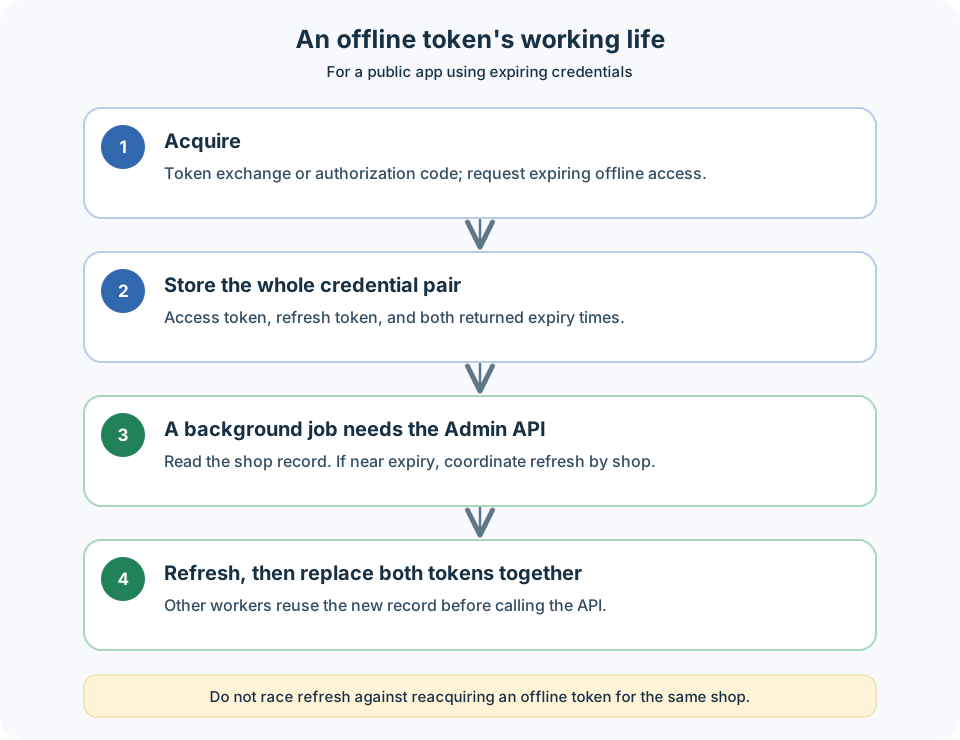
An expiring offline access token currently lasts one hour. Its refresh token initially lasts 90 days, but the remaining lifetime can change as it is used. Persist the returned expires_in and refresh_token_expires_in values as expiry times rather than hard-coding either duration. Refresh before the access token expires so a webhook or queue worker does not have to discover the problem through a failed API call. If the refresh token itself has expired, it cannot be used to renew access; the app must obtain credentials through the appropriate authorization path.
Each refresh returns both a new access token and a new refresh token. Save them, with their expiry times, as one update. Keeping the new access token alongside an old refresh token leaves the next renewal using the wrong credential. Shopify’s app templates handle refresh for most apps; custom authentication code has to manage it explicitly.
A storage record needs more than a token string. The exact schema is up to the app, but these fields should not be conflated:
Offline: shop, access_token, access_token_expires_at,
         refresh_token, refresh_token_expires_at

Online:  shop, user_id, access_token, access_token_expires_at
Keep access and refresh tokens on the server and out of routine logs. An expiry timestamp tells you when to renew; it cannot guarantee the token remains valid until that instant. Staff logout can revoke an online token, and uninstall or credential revocation can end offline access.
Refresh one store at a time
With multiple workers, two jobs may read the same near-expiry record and both start a refresh. If each writes the result, the final database value depends on timing. Coordinate refresh per shop: acquire a lock or serialize the work, reread the token record after coordination, and skip the refresh if another worker has already completed it. Otherwise, refresh and commit the new token pair and expiry times together.
That coordination also needs to cover acquiring a fresh offline token through token exchange or an authorization-code grant. Shopify warns against refreshing and reacquiring a token for the same store at the same time: each operation can retire the other’s result.
This does not mean the old refresh token dies the instant it is presented. Shopify keeps it usable for a limited window, which ends when the newer refresh token is used, another token is acquired, or its time limits are reached. That grace period helps rotation complete; it is not a reason to let workers continue writing different token generations to the same shop record.
When an existing app has unexplained authentication failures, trace three paths in its code: the credential used by a staff-triggered action, the credential read by a webhook or queue worker, and the code that renews offline access. The database key and cache key often reveal the problem faster than changing OAuth parameters. Both online and offline access tokens can start with shpat_, so their prefix will not tell you which path produced them.
Shopify documentation
Mttao GitHub ↗
Exploring technology and life's wisdom