dns · · 17 min read
Is NameSilo a Good Fit for Overseas Domain Registration?
Is NameSilo a good registrar for China-based teams going global? Check registration and renewal prices, Alipay checkout, WHOIS privacy, transfers, DNS, and account security before you buy.
 Mttao @bearboy80 3,681 words 中文 →
Independent sites, SaaS products, content sites, and cross-border brand sites all start with a domain. You can move a website or swap a builder. A domain that customers already remember, search engines already index, and email, ads, and third-party tools already depend on is much harder to replace.
So do not buy on the first-year price alone. Ask five questions first: What does renewal cost next year? Can checkout use Alipay? Will a transfer stall on EPP, a lock, or email confirmation? Does the TLD allow privacy? Who owns the expiration process?
This article does not argue that NameSilo is right for everyone. It only lays out what China-based teams going global should verify around registration, payment, renewals, and security. For a side-by-side registrar comparison, start with the overseas domain registrar guide. To price a domain over three years, see how to choose a cheap domain.
What is NameSilo, and what role does it play in a going-global project?
NameSilo is an overseas registrar focused on domain registration and management. Its about page also lists hosting, site builders, SSL, Premium DNS, email, bulk tools, and an API, plus security options such as 2FA and Domain Defender.
For a going-global team, treat NameSilo as the domain and basic control layer. You can register and manage the domain there, then point DNS, hosting, CDN, business email, analytics, and payments at the same brand name. It is not a sourcing tool. It will not handle overseas tax, logistics, or collection compliance, and it will not make an English site convert in a local market by itself.
That split matters. A registrar is responsible for the domain and the controls around it. Site speed, payment success, ad attribution, support language, and market-specific compliance still have to be solved in other systems.
For users in China, NameSilo has one more concrete convenience: you can try paying with Alipay at checkout. That lowers the first-order barrier. It does not replace a long-term renewal plan.
What Alipay support actually means for users in China
NameSilo’s payment options page lists Alipay as an accepted Web Money method, alongside UnionPay, cards, PayPal, and account credit. If you already use Alipay, that can remove one extra setup step the first time you buy a domain.
When does that help? You may be testing an overseas site, grabbing a brand name, or starting an independent store and do not want to apply for or bind an international card just to register a domain. If Alipay appears on the checkout page, you can finish that order there.
Alipay support does not settle every payment question. Whether the current order can use it still depends on checkout: the TLD, order amount, promotion, region, and payment-channel risk checks can all change availability. Refunds, FX, and limits should not be inferred from the words “Alipay accepted” alone.
One easy miss: NameSilo’s automatic renewal page lists account credit, a saved card, and PayPal as renewal payment sources. It does not list Alipay as a direct auto-renewal method. Alipay may get the first order done. A core domain still needs a reliable renewal method and expiration alerts.
| Helpful for China-based buyers | Do not infer this |
|---|---|
| You can try paying for a domain order with Alipay at checkout | Every TLD, promo, or order will accept Alipay |
| It sits alongside UnionPay, cards, PayPal, and account credit | Auto-renewal, refunds, FX, and risk checks have no extra conditions |
| It lowers the first-purchase barrier for an overseas service | It replaces cross-border collection, tax, support, or localization |
Register a domain at NameSilo in 7 steps
These steps work for a first NameSilo account and for a new brand’s primary domain. Pages and payment options can change. Treat the cart as the source of truth.
1. Decide the use case before you pick a TLD
Open the NameSilo domain search page, type the name, and compare several endings at once. For a primary brand domain, check four things: is it easy to remember, easy to spell, unlikely to collide with an existing brand, and cheap enough to renew for years.
If the result is marked Premium, read the price before you add it. Premium names can have different registration, renewal, and transfer fees than a standard domain.
2. Use filters, but do not hoard names
The page supports single search, bulk search, and TLD filters. Bulk search is useful for brand variants or country sites. Do not buy every name that happens to be available if you have no use for it.
3. Check three prices before the domain goes in the cart
Confirm these on the pricing page or in the cart:
| Item | What to confirm |
|---|---|
| Current registration price | Regular price or first-year promo; whether term length changes the rate |
| Renewal price | What you will pay to keep it after year one |
| Transfer and premium terms | Whether it is premium, and any special inbound-transfer rules |
For a primary domain, compare registration, renewal, and transfer together. Saving a few dollars in year one may not offset a higher renewal or a harder management rule later.
4. Create the account with a mailbox the team can keep
Create an account through Sign Up / Create Account before or during checkout. Use a mailbox the team can keep managing. Do not bind the registrar account to one employee’s personal email. Decide who can log in, who pays, and who maintains DNS.
Turn on 2FA after signup and check recovery details. Losing a domain account usually affects more than one URL. The website, email, and third-party verifications can go with it.
5. At checkout, confirm the coupon, privacy, and payment method
If you qualify, try VIP16888 for new users or VIP123 for existing users. Trust the discount and the renewal price shown in the cart. For the exact submit steps, see the NameSilo coupon and savings guide.
Also confirm that WHOIS privacy applies to the TLD. NameSilo offers privacy on many endings, with exceptions such as .us, .in, and .tickets. .ca has its own rules.
NameSilo’s payment options page lists Alipay as an accepted Web Money method. Whether it appears for this order still depends on checkout. If Alipay is missing, use account credit, a card, PayPal, or another method shown on the page.
6. After payment, check the domain and DNS first
Sign in and confirm the domain is in the list, the registration term is correct, the admin mailbox can receive mail, and the nameservers match the launch plan. If you are connecting Shopify, WordPress, Cloudflare, hosting, or business email, get the nameservers or DNS records from that provider before you change anything. Back up the current records so you can roll back.
7. Finish renewal, security, and handoff the same day
Set or confirm auto-renewal, enable 2FA and change alerts, and write down the domain, expiration date, owner, DNS host, and renewal payment method in a team doc. Alipay can make the first payment easier. A core domain still needs a reliable renewal method and an expiration reminder.
Buying a domain is not a one-time purchase
The work after purchase is usually larger than the purchase itself: renewals, DNS changes, business email, inbound and outbound transfers, privacy, team access, and account security. When a domain fails, you do not just lose a URL. The site can go down, business email can stop, and ad landing pages or third-party checks can break with it.
NameSilo’s public product pages show registration, renewal, and transfer prices separately, and they also tier prices by TLD, purchase quantity, and the number of active domains on the account. Promo and regular prices are marked separately. See the domain pricing page. The layout is a reminder: a first-year discount does not prove a low holding cost.
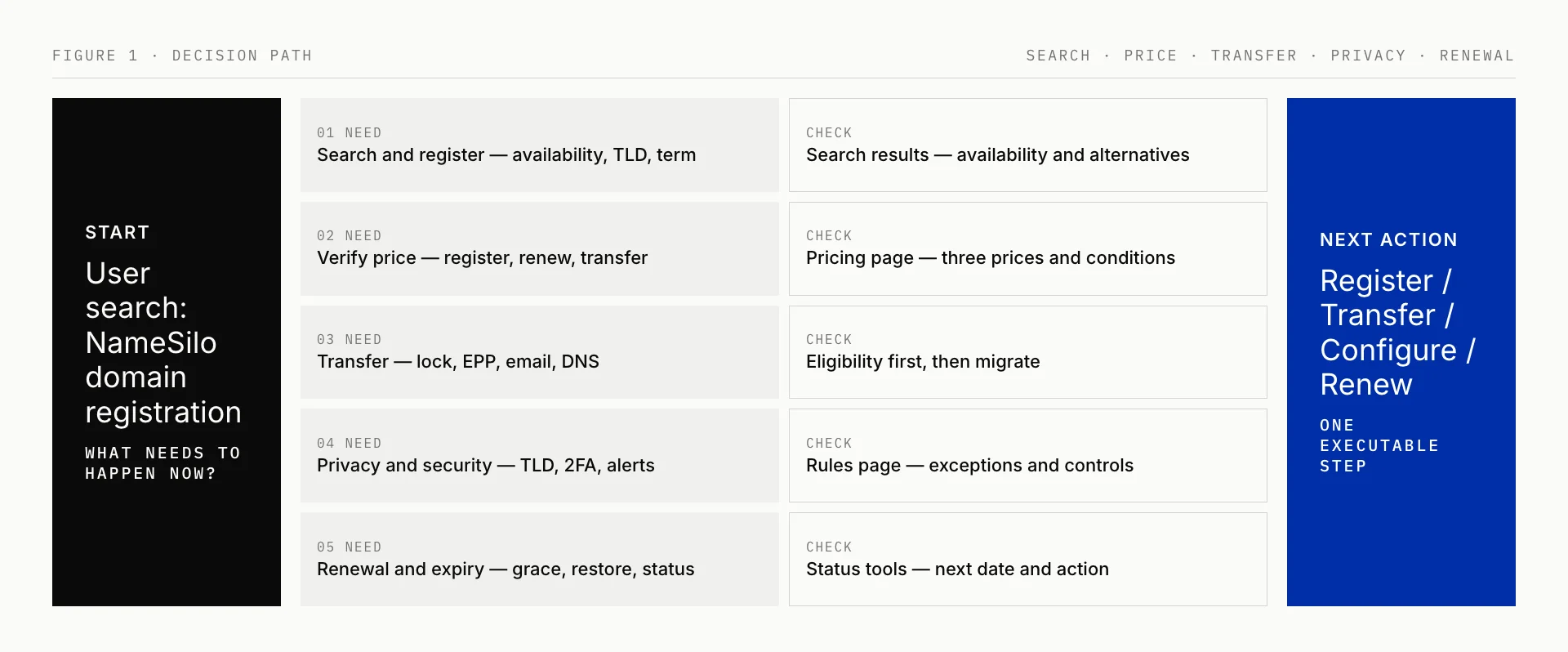
Figure 1: People usually move among availability, price, transfers, privacy, security, and renewals. Each step needs different information.
| What you are doing | Check this before you act | Common mistake |
|---|---|---|
| Registering a new domain | Availability, TLD, term, premium status | Looking only at the first-year price |
| Comparing cost | Registration, renewal, transfer, promo terms | Comparing different TLDs or terms as if they were the same |
| Transferring an existing domain | Lock, EPP/AuthInfo, admin mailbox, nameservers | Assuming a transfer request needs no follow-up |
| Enabling privacy | Whether the TLD qualifies | Assuming free privacy works on every ending |
| Managing expiration | Auto-renewal, payment method, grace period, restore rules | Assuming you can always renew at the old price after expiry |
The next sections follow that table: price first, then privacy, transfers, renewals, and security.
How to read prices: put registration, renewal, and transfer side by side
The easiest pricing mistake is treating the registration fee as the long-term price. In practice, check three numbers: what you pay now, what you pay to renew, and what a later inbound or outbound transfer will cost and require.
| Check | Confirm this |
|---|---|
| First-year registration | Whether the TLD is on promo, and whether that rate is first-year only |
| Renewal | The regular renewal after the promo ends |
| Transfer | The transfer fee, whether a year is usually added, and the exceptions |
| Quantity | Whether volume or active-domain tiers apply |
| Domain type | Premium status, a special TLD, or extra registry rules |
| Final total | Tax, coupons, add-ons, and the amount shown in the cart |
NameSilo does list registration, renewal, and transfer separately. That does not mean it is cheaper than every other registrar on every TLD at every moment. Porkbun’s pricing page also states how it presents prices. Cloudflare’s registrar page positions itself as at-cost registration and renewal with no add-on fees. For a NameSilo vs Porkbun breakdown, see NameSilo vs Porkbun.
Keep the variables aligned: the same TLD, the same term, and the same premium status, then compare registration, renewal, and transfer. Otherwise “cheaper” is usually a page impression, not a number you can recheck.
WHOIS privacy: free does not mean every TLD can use it
WHOIS privacy reduces how much of the registrant’s contact data appears in a public lookup. NameSilo’s privacy article says it provides this through PrivacyGuardian.org. After you enable it, public queries show the privacy service, and contact requests can be forwarded to the address on the account.
Confirm the TLD first. The same page lists endings such as .us, .in, and .tickets as ineligible. .ca has a different redaction setup for individual registrants. Common endings such as .com, .net, and .org are usually straightforward. Country-code and specialty endings are worth a second look in search results and the cart.
| Common claim | More accurate reading |
|---|---|
| “Free privacy works on every domain” | Eligibility depends on the TLD and registry rules |
| “Privacy means nobody can reach me” | Requests can still be forwarded to the account mailbox |
| “Privacy equals anonymity” | It reduces public exposure. It does not remove registrant duties or replace account security |
Domain transfers: check eligibility before you pick a date
A domain that already serves a site, business email, or ad landing page needs more checks than a new registration. NameSilo’s transfer page says a successful transfer usually adds one year. That may not apply if the domain was renewed at the losing registrar within 45 days, or if adding a year would exceed the maximum registration term.
There is no single completion time. NameSilo’s transfer FAQ says a transfer can finish in about 30 minutes or take 5–6 days, depending on the losing registrar, whether the domain is unlocked, whether the EPP/AuthInfo is correct, and whether confirmation email is handled.
ICANN’s registrant transfer guide also notes a 60-day restriction after a new registration, a recent transfer, or some contact changes. AuthInfo/EPP codes are the usual proof of control. A registrar should provide the code within five calendar days of a request.
| Order | Confirm this | Why |
|---|---|---|
| 1 | Whether you are inside a lockout after a new registration, recent transfer, or contact change | Avoid submitting a transfer that the 60-day rule will block |
| 2 | Whether the domain is unlocked | A lock can stop the transfer |
| 3 | Whether you have the EPP/AuthInfo | This is the usual authorization credential |
| 4 | Whether the admin mailbox receives mail | Unhandled confirmation mail can stall the process |
| 5 | Who hosts the current nameservers | This decides whether the site, email, and DNS need extra work |
| 6 | Whether expiry or redemption is close | This changes timing, transferability, and possible fees |
If the domain does not use the current registrar’s nameservers, a transfer often does not change site or email resolution. NameSilo also notes exceptions, so do not read that as “no downtime in every setup.” For a business domain, record nameservers, key DNS records, and email dependencies before you start. That is usually safer than trying to finish as fast as possible.
Renewals, expiry, and restoration: do not leave a core domain to chance
Domains usually expire because a payment method failed, nobody watched the notice mailbox, or the team thought someone else had already handled it—not because nobody wanted to renew.
NameSilo’s automatic renewal page says auto-renewal is optional and can be toggled per domain in Domain Manager. The system tries to renew domains that expire that month at the start of the month. Payment sources are account credit, a saved card, and PayPal. Users are notified if funds are short or a payment method fails.
Its expiration process page says a standard domain is usually in a 30-day grace period after expiry, then may move into auction, restore, and deletion stages. Timelines and restore terms can differ by TLD. Do not treat “I renewed after expiry last time” as a rule for every ending.
| Current state | Do this first | Do not assume |
|---|---|---|
| Expiring soon | Check auto-renewal, the payment method, and the contact mailbox | The system will always renew on the last day |
| In the grace period | Confirm you can still renew or transfer | Every TLD has the same grace window |
| In auction or restore | Check the current status and fees; contact support if needed | You can always get it back at the old price |
| Many domains in one account | Audit expiration dates, owners, and payment methods | The account will manage every domain for you |
Security settings: the registrar provides the tools; you decide whether to turn them on
NameSilo’s Domain Defender article says the platform offers free two-factor authentication and can pair it with Domain Defender. That feature can require a security-question check before domain changes, and it can send email or SMS alerts for nameserver edits, lock/unlock, contact updates, and auth-code requests.
These tools cannot guarantee a domain “cannot be stolen.” They do reduce a few common failure modes: someone changing DNS after a password leak, an auth-code request the team never sees, a contact record replaced by mistake, or a former employee still holding control.
| Action | Problem it mainly reduces |
|---|---|
| Enable 2FA | Login that depends on a password alone |
| Turn on change alerts | Silent DNS, contact, lock, or transfer-request changes |
| Recheck the domain lock | Accidental or unauthorized outbound transfers |
| Keep recovery details | Losing a device, mailbox, or security-question answers |
| Avoid a personal mailbox as the only control point | The domain leaving with one person when the team changes |
Going-global teams: assign ownership before something breaks
After you have checked price, privacy, transfers, and security, put a name on each responsibility. Many failures are not website or ads problems. They happen because registration, DNS, payment, and the admin mailbox sit with different people. Growth or a staffing change then exposes the gap.
The habits below are not NameSilo-specific. They apply to any team that holds a business domain.
| Area | What to do | Why |
|---|---|---|
| Brand and TLD | Check brand availability, trademark risk, and common misspellings in the target market before you pick a primary domain and defensive endings | Avoid launching into a name conflict, a spelling trap, or a third-party registration |
| First payment and renewal | Confirm Alipay at checkout if you need it; assign an owner, expiration alerts, and a usable renewal method for core domains | An easy first purchase does not guarantee a clean renewal |
| DNS and the site | Record the registrar, DNS host, web host/CDN, and email provider separately | The team can find the responsible system during a move, outage, or failed verification |
| Account security | Enable 2FA, change alerts, and domain protection; do not leave control on one employee’s personal mailbox | A lost login, a bad DNS edit, or a departure should not take the domain with it |
| Transfer and exit | Keep the path to EPP/AuthInfo, and export the domain list and expiration dates regularly | A later registrar change does not start from zero |
| Localization checks | Test payment, currency, coupons, and the target TLD on a real checkout page; check page language, legal copy, and mail delivery before launch | Buying a domain is not the same as a working going-global stack |
If you already have several domains, sites, and mailboxes, run one non-critical domain through the full loop first: buy it, set DNS, verify business email, set renewal, export the auth code, then test the outbound path. That surfaces permission, payment, and DNS issues before you move the primary name.
Who should look at NameSilo more closely?
| Situation | Why it may fit | Still confirm |
|---|---|---|
| You want one place for many domains | Bulk search, price tiers, and a transfer path | Registration, renewal, and transfer prices at your actual volume tier |
| You want less WHOIS exposure | Documented privacy service and rules | Whether the target TLD is an exception |
| You plan to inbound-transfer from another registrar | Transfer page, FAQ, and status notes | The 60-day rule, EPP, lock, mailbox, DNS, and expiry state |
| You care about change control | 2FA, Domain Defender, and change notices | Whether the team will actually enable and maintain them |
| You want Alipay for the first order | Official payment page lists Alipay as accepted Web Money | Whether this order, promo, and checkout support it, and how renewal will be paid |
| You have complex DNS or a high-value domain | It can be one candidate registrar | Current DNS/email dependencies, ownership, recovery, and incident steps |
When you compare NameSilo, Porkbun, or Cloudflare, write down the two or three things you care about most: long-term renewal cost, privacy eligibility, bulk management, a developer security stack, payment methods, or transfer visibility. Platforms optimize for different jobs. The answer is rarely “best for everyone.”
Before you pay, run this checklist once
| Area | Question | Passes if |
|---|---|---|
| Domain | Is the name available, is it premium, and does the TLD fit the business? | You know what you are buying and have a fallback |
| Price | What are registration, renewal, and transfer, and when does the promo end? | You have seen all three prices and their conditions |
| Coupon and payment | Did the coupon apply? Does Alipay appear at checkout? | You trust the cart total and the payment methods shown |
| Privacy | Does this TLD allow privacy? | You have checked the exceptions |
| Transfer | Are you blocked by a lock, the 60-day rule, EPP, or confirmation email? | Eligibility and owners are clear |
| DNS | What nameservers and email dependencies are in use? | You know what to keep and what to change |
| Expiry | Are auto-renewal, the payment method, and the notice mailbox valid? | There is an owner, a reminder, and a backup |
| Security | Are 2FA, change alerts, and recovery details in place? | Control does not depend on one password or one person |
Compare the holding cost, not the first-year discount
NameSilo can stay on the shortlist for China-based teams going global, especially if you want to try Alipay on the first order and keep price, transfers, privacy, renewals, and security settings in one account. It is not a set-and-forget service, and it does not replace tax, payments, logistics, or localization work.
Check the full-cycle price before you register. After you buy, own the renewal and the payment method. Check eligibility before you migrate. Assign access inside the team. Those steps reduce more risk than saving a few dollars in year one.
Sources and policy links
- NameSilo domain pricing
- NameSilo domain search
- NameSilo domain transfers
- NameSilo transfer FAQ
- NameSilo WHOIS privacy
- NameSilo automatic renewals
- NameSilo expiration process
- NameSilo Domain Defender
- NameSilo payment options
- NameSilo about
- ICANN: registrant transfer guide
- Porkbun domain pricing
- Cloudflare Registrar
Mttao GitHub ↗
Exploring technology and life's wisdom