Shopify · · 14 min read
Choosing a Shopify App Stack: Official Template, Hybrid, or Custom
Choose a Shopify app architecture around the merchant workflow and integration ownership. Compare the React Router template, hybrid services, custom embedded apps, API-only integrations, and extension-only apps, with a practical production checklist.
 Mttao @bearboy80 3,074 words 中文 →
A merchant needs to configure an inventory rule, check why an order failed to sync, and change their subscription. Your team needs to connect those actions to a backend it can operate reliably. Whether that backend already runs on Java, Python, or Node is only part of the architecture decision.
For a new public app whose core workflow belongs inside Shopify Admin, the official React Router template is a sensible starting point. It connects the embedded App Home, authentication, Admin API client, application configuration, and common webhook entry points. You can then build the actual product around that integration.
An existing enterprise platform may justify a different arrangement. Often, the useful compromise is a small Shopify-facing application connected to established domain services. A fully custom embedded implementation makes sense when a concrete platform constraint prevents that arrangement and the team can maintain Shopify’s integration protocols over time.
The decision gets easier if you settle the merchant experience before choosing the framework.
Start with the workflow, distribution, and runtime
Consider two products. An inventory app gives merchants controls and status screens inside Admin. An internal warehouse connector runs in the background while operators work in their warehouse system. Both may synchronize products and orders, but they have different interfaces, authorization flows, and operational boundaries.
Answer four questions before scaffolding either one:
- Where does the merchant work? Do they need to configure or operate the product inside Shopify Admin?
- Who can install it? Public distribution and custom distribution have different installation, review, and billing rules. The distribution method cannot be changed after selection.
- Where can the interface run? A developer-hosted iframe App Home and a Shopify-hosted App Home UI extension have different capabilities.
- Who owns the Shopify integration? Will the team keep the official template, retain a thin integration layer, or implement authentication and platform lifecycle handling itself?
Public distribution is intended for apps offered through the App Store to arbitrary merchants. Custom distribution installs an app on one store or stores in one Plus organization, without App Store review and without the Billing API.
A standalone console can make sense for an internal integration. For an ordinary public App Store product, plan a merchant-operable UI and integrate off-platform features into a consistent embedded Admin experience. A purely external console or API service does not satisfy that requirement by itself.
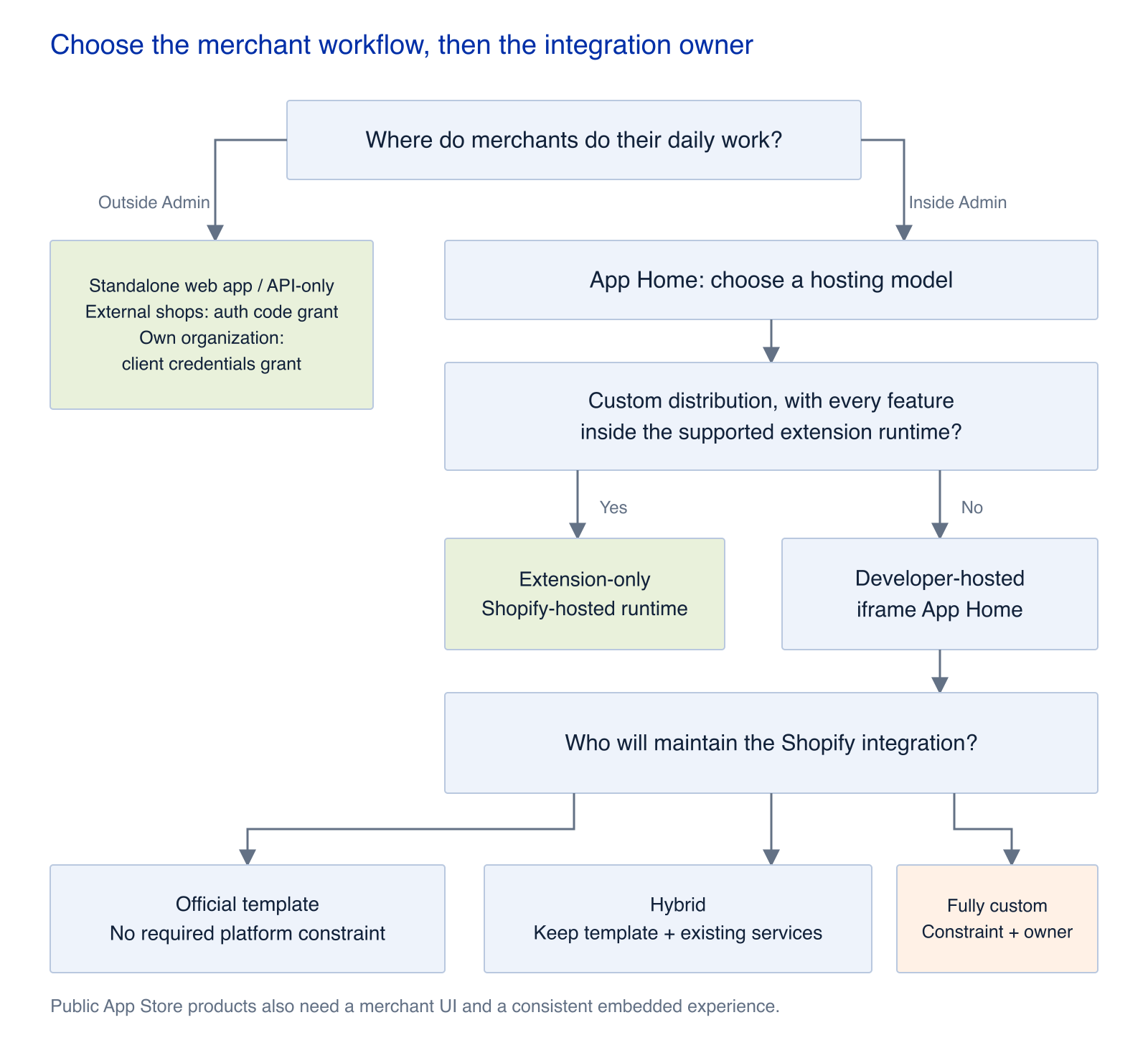
Decide the work surface first. Then check the extension runtime and choose who will maintain the Shopify integration.
When Shopify can host the entire app
Extension-only apps are a specialized option for custom distribution. They can include an App Home UI extension, and their functionality must fit within the supported extension targets and capabilities.
For App Home specifically, the Shopify-hosted UI extension uses Preact, allows a subset of browser and target APIs, and has a compressed bundle limit of 64 KB. If the interface outgrows that runtime, it must be reauthored as an iframe app. Migration in the opposite direction is not supported.
This route can fit a focused Checkout, POS, Flow, customer account, or App Home capability. Check the actual target: some extensions support declared or approved network access, so an external API dependency does not automatically require your own backend.
Public distribution, background jobs, webhook processing, your own persistence, or an interface that exceeds the runtime’s capabilities generally calls for a developer-hosted application.
Separate the toolchain from the application template
Shopify CLI, the Dev Dashboard, and shopify.app.toml belong to the platform toolchain. You can use them with a custom application. Registration, local development tunnels, configuration, and extension releases are not exclusive benefits of the React Router template.
The template’s contribution is the runtime code that connects those capabilities: App Home routes, server-side authentication, session storage, an Admin API client, and webhook handlers.
That code belongs to your team. You can change the database, hosting provider, queue, monitoring stack, or domain model. Keeping the template at the Shopify boundary does not require putting every business operation into a route loader or action.
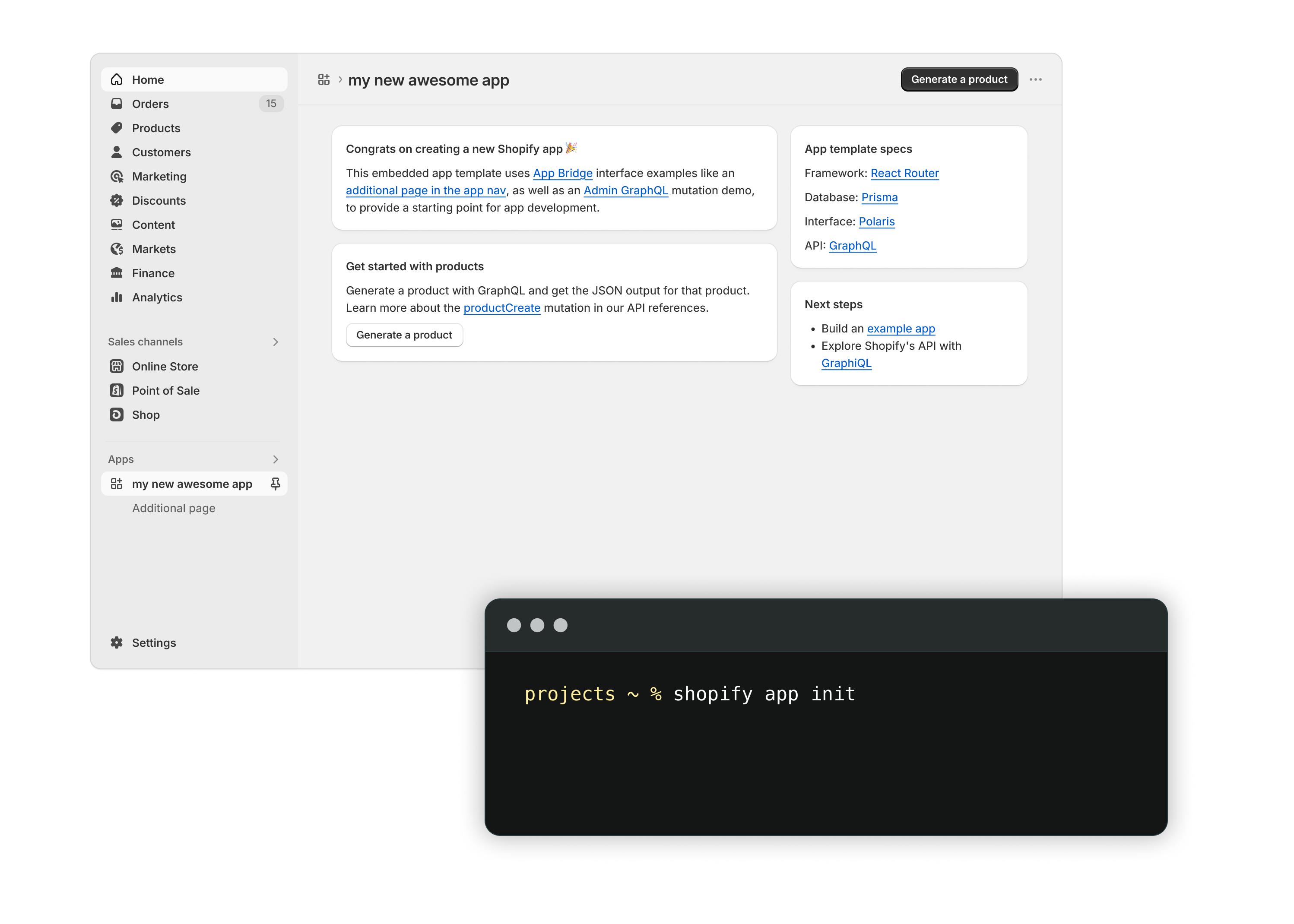
The scaffold provides a working Shopify integration. Domain services and production infrastructure remain application decisions.
Five architectures worth considering
| Architecture | Good fit | Shopify integration owner | Main engineering work |
|---|---|---|---|
| Official template with a modular monolith | A new public app, with most merchant work inside Admin | Template code maintained by the app team | Product logic, data, jobs, and operations |
| Template plus existing services | An established backend with an embedded merchant interface | Template or thin App Home integration layer | Tenant context, service authorization, and reliable jobs |
| Fully custom embedded app | Platform requirements cannot accommodate the template boundary | App team implements the protocols | Authentication, tokens, webhooks, configuration, and upgrades |
| Standalone web app or API-only integration | Internal systems, automation, or an existing enterprise console | App team chooses the grant for its audience | Data mapping, throttling, recovery, and reconciliation |
| Extension-only app | A specific customer, custom distribution, and a supported extension workload | Shopify hosts the extension; the team implements target-specific behavior | Runtime limits and extension functionality |
Official template with a modular monolith
For a new public SaaS app, this is usually the shortest path to a complete merchant workflow: install, authorize, configure, run a useful operation, handle failures, and charge for the product where appropriate.
Keep business rules in services with explicit interfaces. Routes can authenticate requests and invoke those services. Store installation state, tenant data, and task status in the database. Let webhook handlers verify deliveries and durably record work; let workers perform imports, notifications, synchronization, and recalculation.
You can separate the worker deployment when the workload needs it. Additional service boundaries should follow measured load or a real ownership boundary.
For development store setup and local CLI workflows, see the Shopify app development environment tutorial. Its terminal examples document the older CLI and Remix scaffold, while this article addresses architecture selection.
Template plus existing services
Suppose your company already has a Java inventory service or a Python data platform. You can keep that investment and use a small Shopify-facing layer to handle installation, embedded authentication, minimal session state, API adaptation, and webhook ingestion.
The existing services continue to own inventory, orders, business rules, AI workloads, analytics, or enterprise permissions. The Shopify-facing layer passes a verified shop, installation, and user context to them.
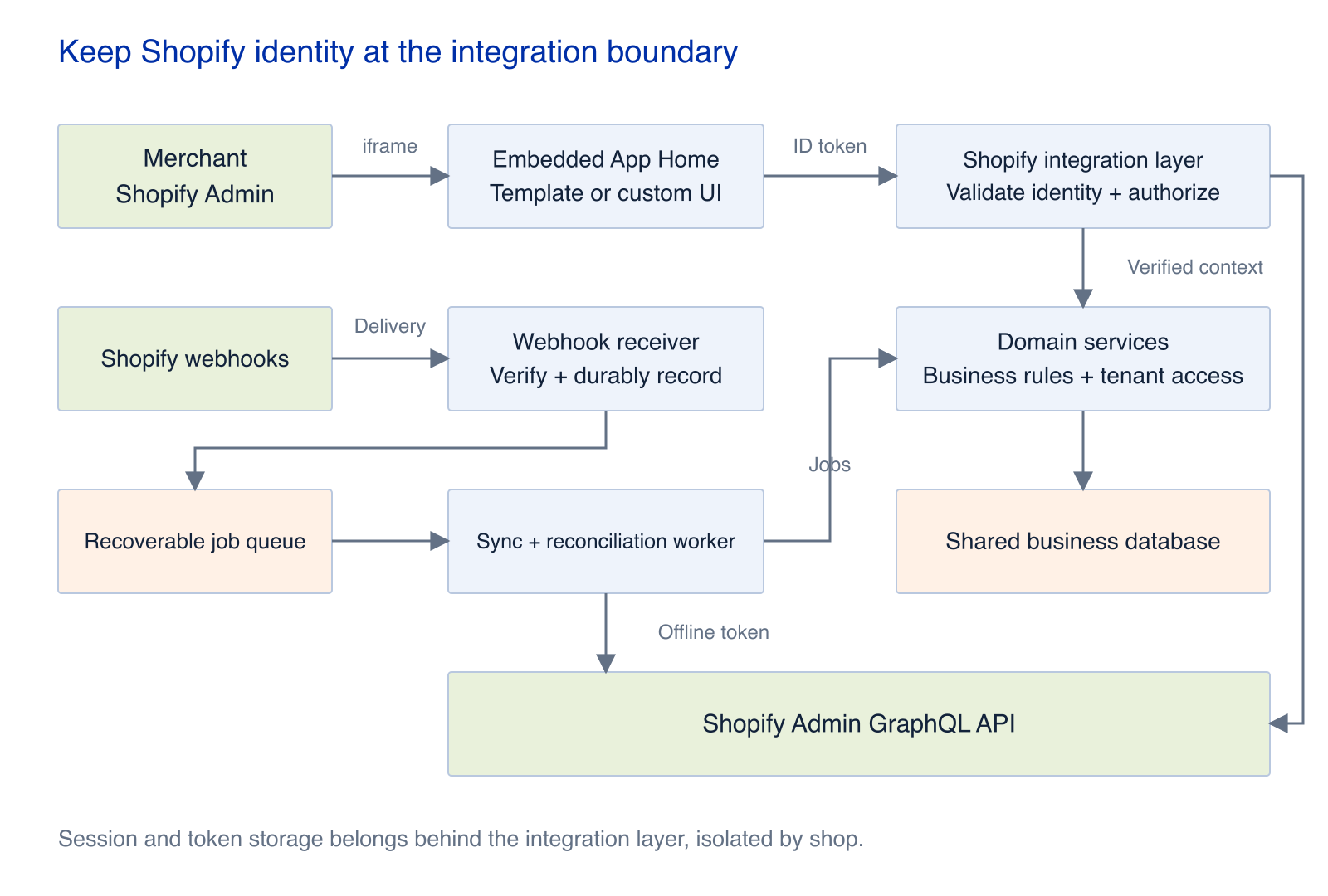
The integration layer establishes Shopify identity. Domain services authorize business operations, while webhook work runs through a durable queue.
Tenant isolation is the critical contract. A downstream service must not trust a shop value simply because the request originated in a Shopify interface. It must establish that the verified installation and requested resource belong to the appropriate organization.
This architecture is often a better fit than rebuilding embedded authentication in the language of the existing backend. The latter may still be necessary, but it should solve a specific constraint.
Fully custom embedded application
A custom implementation can be justified by mandatory runtime, identity, or compliance requirements that cannot accommodate a template-based integration layer. Familiarity with another framework alone gives you less reason to take on the protocol maintenance.
Establish the authorization model for each kind of request:
- Embedded browser requests: Obtain an ID token through App Bridge. The backend validates its signature and claims, including
exp,nbf,aud,iss, anddest, before performing token exchange as needed. - Background work: Use a securely stored offline access token. Public apps calling GraphQL Admin API must use expiring offline tokens and rotate access and refresh tokens safely. Existing public apps must migrate before January 1, 2027, when non-expiring offline tokens can no longer be used for those requests.
- Operations governed by staff permissions: Use an online token where the product requires Shopify to apply the individual staff member’s permissions. Renew it through the appropriate active-session flow after expiry or logout; do not hand it to a long-running background task.
The online and offline token guide covers the permission boundary, storage model, and refresh coordination in more detail.
Assign an owner for the implementation, integration tests, dependency upgrades, and incident response. The difficult part is keeping the app correct across reinstallations, permission changes, token expiry, and platform updates.
Standalone application or API-only integration
This fits an internal ERP, warehouse system, product information system, BI platform, or automation service where the primary work already happens outside Admin.
An integration serving external stores uses the authorization code grant. Validate the OAuth state, callback HMAC, and shop domain, then store credentials separately for each shop. Server-side integrations acting only on stores in the same Dev Dashboard organization can consider the client credentials grant; renew an expired token by repeating that grant.
Even a small connector needs per-shop throttling, idempotent webhooks, reconciliation, token lifecycle management, failure alerts, and uninstall cleanup. If the product later becomes an ordinary public App Store app, account for the embedded merchant UI, installation experience, and review requirements in that change of scope.
Production requirements follow you into every architecture
The template reduces the setup work at the Shopify boundary. The application still needs durable jobs, secure credentials, predictable releases, and a recovery plan.
Deploy the web service and Shopify configuration together
Keep application-level settings in shopify.app.toml: application URL, redirect URLs, scopes, webhooks, and app proxy configuration. Extension-specific type and settings belong in each extension’s shopify.extension.toml. Version these files and use separate development and production configurations.
shopify app deploy releases an app version containing configuration and extensions. It does not deploy the web service. Deploy that service to your chosen host separately, and check that its code is compatible with the application URL, OAuth callbacks, scopes, and webhook configuration.
Exercise both rollback paths. Reverting a web deployment while leaving incompatible Shopify configuration live can break installations even when the application process itself is healthy.
Treat credentials and scopes as part of the tenant model
Keep secrets, access tokens, and refresh tokens on the server and isolated by shop. Exclude them from browser responses, logs, and error tracking. Encrypt stored sessions and access tokens using managed keys or controlled application-level encryption.
Every requested scope should have an identifiable purpose: the resources it permits, when the app uses it, and the effect of removing it. With Shopify managed installation, required scopes come from the deployed [access_scopes].scopes configuration. Declare optional capabilities with optional_scopes and request them when needed; configuration alone does not mean the merchant has granted consent.
Acknowledge webhooks after a durable commit
Imagine a handler that saves a delivery ID, crashes before enqueueing the job, and then treats the retry as a duplicate. The delivery exists in the database, but the business operation has vanished.
Avoid that failure by making the delivery record and recoverable task part of one durable transaction, or by writing a transactional outbox. A successful acknowledgement should mean that work can survive a process restart.
For HTTPS deliveries, validate the HMAC against the raw request body before trusting the payload. Google Cloud Pub/Sub and Amazon EventBridge use their own authentication mechanisms rather than this HTTPS HMAC check.
Use X-Shopify-Webhook-Id to identify retries of an individual delivery. Multiple subscriptions triggered by one merchant action receive different delivery IDs and share an X-Shopify-Event-Id; the event ID lets you correlate those deliveries.
Shopify allows one second to establish the connection and five seconds for the entire HTTPS request. Return a 2xx response after the durable commit. Redirects and other responses outside the 2xx range are treated as failures.
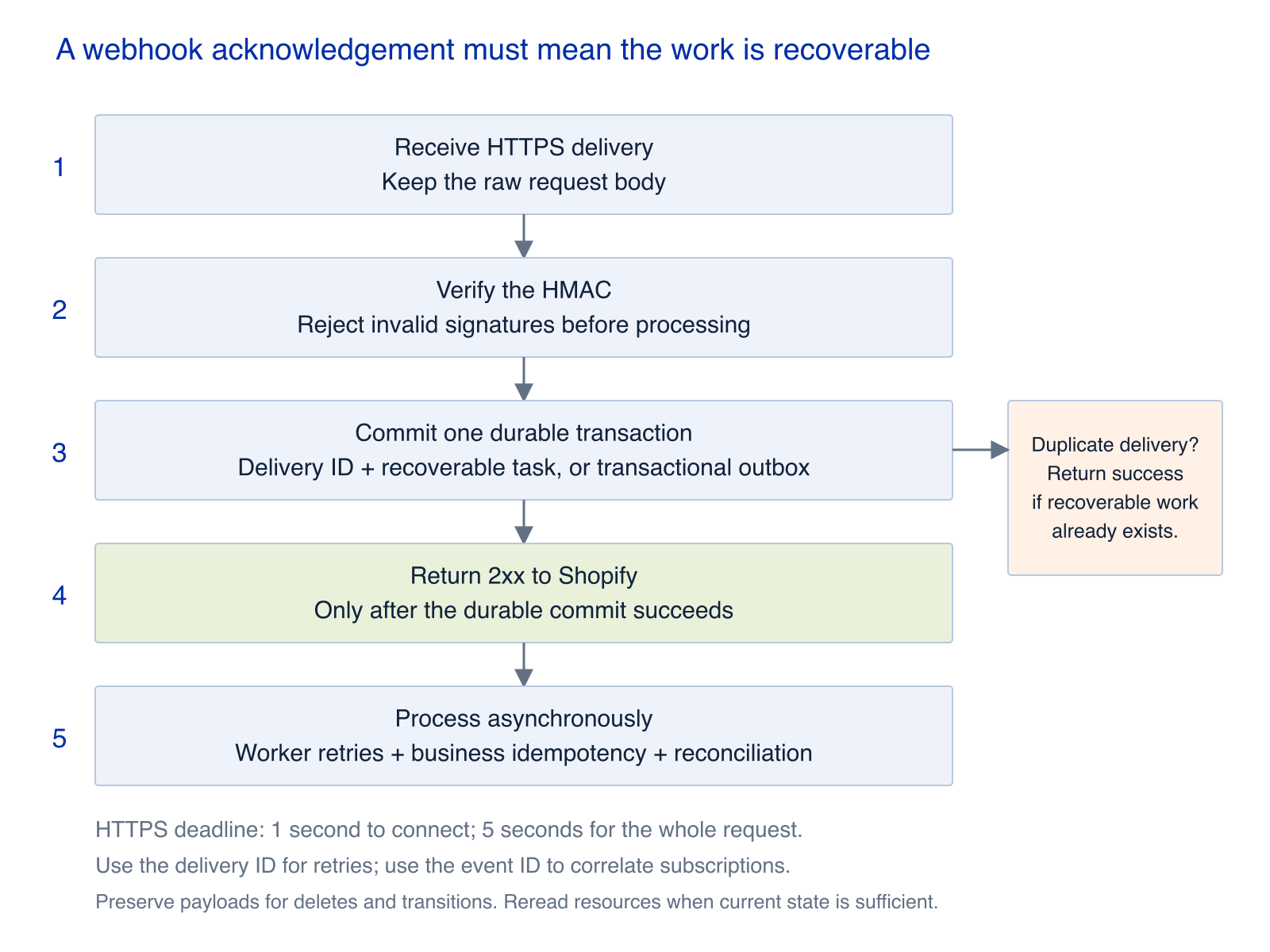
Commit the delivery and recoverable work before returning success. Workers handle retries, business idempotency, and reconciliation.
Deliveries may be duplicated or arrive out of order. For create or update topics where the current state is what matters, a worker can reread the resource and compare version information such as updated_at. For deletion, revocation, or meaningful state transitions, retain the verified payload and headers; fetching the current resource cannot reconstruct every past event.
Run periodic API reconciliation as well. Webhooks should not be the only way the app discovers that data needs repair.
Choose a database for the deployment topology
The official template starts with Prisma and SQLite. SQLite can work in production when there is one web instance, durable storage, verified backup and restore, and an acceptable single-instance failure window.
A persistent volume preserves the file across restarts. It does not automatically provide shared access across nodes, safe concurrent replicas, or failover.
For multiple web containers, cross-node scaling, high availability, or shared session and job state, prefer a service database such as PostgreSQL or MySQL. If you continue with SQLite, establish a single database owner and test locking, recovery, backups, and rolling deployments.
Schedule API work by shop
New public apps have been required to use GraphQL Admin API exclusively since April 1, 2025. REST Admin API is legacy. REST 429 and Retry-After handling remains relevant to existing integrations that can still use it.
GraphQL throttling is based on query cost. Ordinary throttling can arrive in an HTTP 200 response with a THROTTLED error, so inspect the response body and extensions.cost.throttleStatus when scheduling retries. Input arrays are limited to 250 items, and ordinary pagination is limited to 25,000 objects.
Give each shop its own scheduling budget. Foreground requests and workers should coordinate against that budget, and a large shop’s historical import should not prevent other shops from making progress.
Use cursors, checkpoints, and restartable jobs for imports and bulk synchronization. A merchant who clicks “Sync” should get a task they can inspect, rather than a browser request that waits until it times out.
Enforce billing entitlements in every execution path
For supported pricing models, Shopify App Pricing is the default for new public apps. One-time purchases and unsupported models require Manual Pricing through the Billing API. Custom distribution cannot use the Billing API.
Shopify can host plan selection and handle billing, but your backend must decide which operations the active plan permits. Use the same entitlement rules in the interface, workers, and internal APIs. A downgrade must affect background jobs as well as visible buttons.
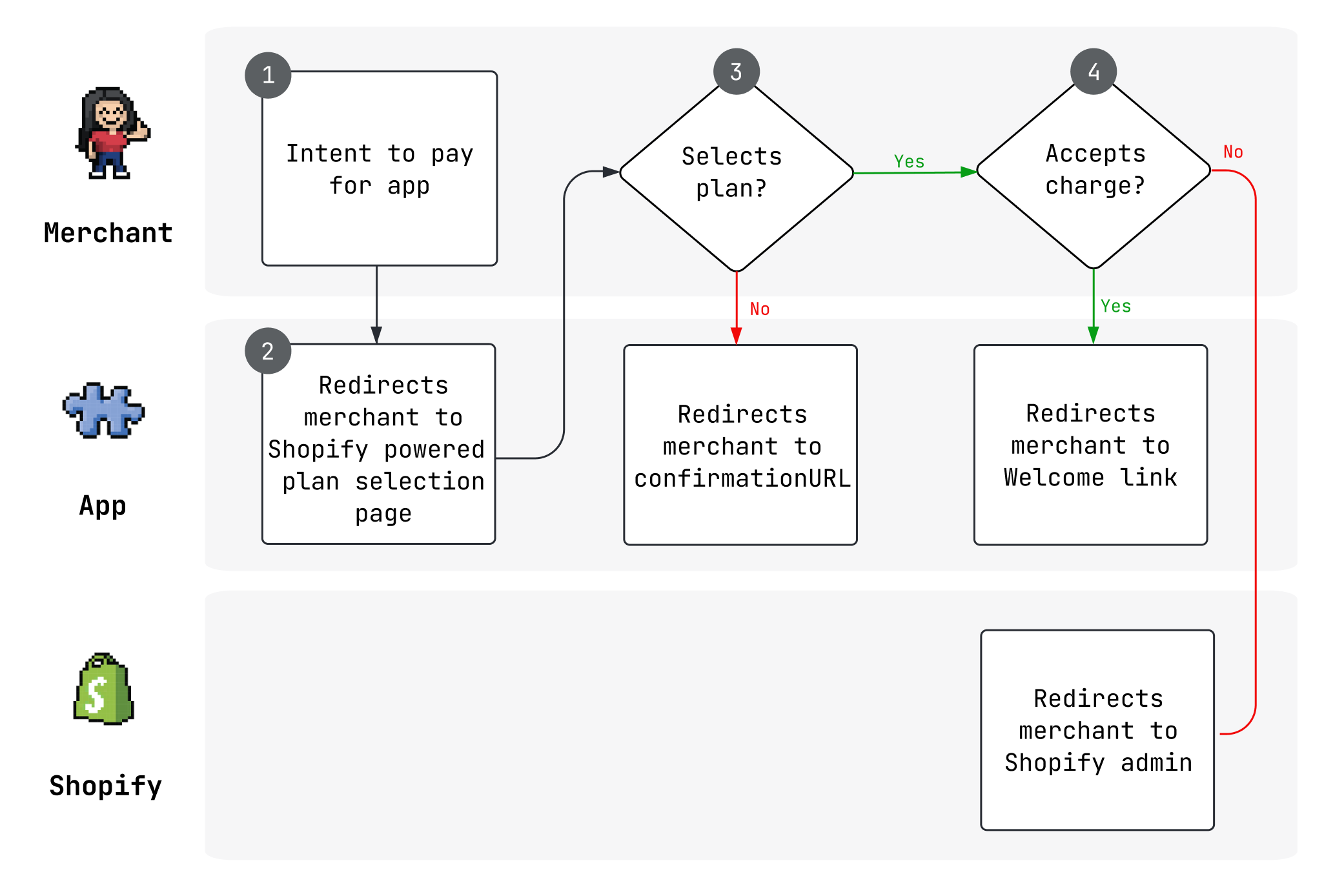
Shopify handles the billing interaction; the application enforces the resulting feature access.
Make privacy requests operationally complete
App Store apps must implement the mandatory compliance webhooks customers/data_request, customers/redact, and shop/redact.
A data request locates and provides information. A redaction request removes or anonymizes it. Acknowledge valid requests with a 2xx response and complete the corresponding action within 30 days, accounting for legally required retention where applicable. Mandatory compliance webhooks with an invalid Shopify HMAC must receive a 401 response.
Document the handling of data beyond the primary database: caches, search indexes, object storage, queue payloads, warehouses, analytics exports, and backup recovery. Give each location an owner, a retention rationale, and a processing method.
Test the merchant journey and the failure paths
A working home page proves little about the installation and background processing lifecycle. Before release, assign owners and keep evidence for these checks:
- Installation and permissions: Test first install, uninstall, and reinstall. Complete the appropriate installation and authorization flow before trial, billing, or business setup. Reject usable installation state when required permissions are denied, and enable new scope-dependent features only after authorization succeeds.
- Delivery and task recovery: Replay a delivery twice and verify that there is only one business effect. Deliver a newer update before an older one. Restart a worker mid-task, recover from a checkpoint, and send exhausted retries to a dead-letter queue.
- Throttling and capacity: Inject GraphQL
THROTTLEDresponses, concurrent imports, and worker restarts. For eligible legacy REST integrations, also test429andRetry-After. Work must survive, shops must make independent progress, and user requests must not depend on a long-lived browser connection. - Isolation and secrets: Reject tampered or missing HTTPS HMAC signatures before enqueueing or writing application data. Verify that one shop cannot access another’s resources, and inspect logs, support tools, and error tracking for exposed credentials or sensitive payloads.
- Release recovery: Rehearse web service rollback and Shopify configuration release or rollback separately. Confirm application URLs, OAuth callbacks, and webhooks after each step.
- Privacy and review: Test valid and invalid signatures for all three compliance topics. Provide reviewers with usable accounts, third-party credentials where required, complete steps, and an English or English-subtitled walkthrough showing core features and expected results.
Make the choice explicit
For a new public app operated inside Admin, start with the official template and a modular application. For an established domain platform, retain a Shopify-facing layer and reuse the existing services. Choose a fully custom embedded implementation when a concrete constraint demands it and someone owns the protocol maintenance.
For internal synchronization or automation, choose the standalone or API-only shape and the grant appropriate to the stores you serve. For a focused custom-distribution workload that fits the extension runtime, evaluate extension-only before adding a web backend.
Write down the reason for the choice, the Shopify responsibilities your team owns, and the conditions that would justify changing the architecture. That gives the team something concrete to revisit when usage or product scope changes.
Reference documentation
Platform requirements were checked on October 4, 2026.
- Shopify Libraries and templates
- Shopify Scaffold an app
- Shopify About app authentication
- Shopify App Template - React Router repository
- Shopify Authenticate an embedded app without a template
- Shopify Build an extension-only app
- Shopify Deploy to a hosting service
- Shopify Select a distribution method
- Shopify About webhooks
- Shopify About billing for your app
- Shopify App configuration
- Shopify Authenticate a standalone or API-only app
- Shopify Best practices for apps in the Shopify App Store
- Shopify API limits
- Shopify Privacy law compliance
- Shopify App Home iframe apps
- Shopify App Design Guidelines
- Shopify Pass app review
- Shopify Apps in App Home
- Shopify Client credentials grant
- Shopify Access tokens
- Shopify CLI app deploy
- Shopify Manage access scopes
- Shopify Verify webhook deliveries
- Shopify App Store requirements
- Shopify Built for Shopify achievement criteria
- Shopify App structure
- Shopify Admin GraphQL API status and error codes
- Shopify Checkout capabilities
Mttao GitHub ↗
Exploring technology and life's wisdom